More patients than ever are turning to AI tools like ChatGPT instead of traditional search engines to find dental practices, compare services, research treatment options, and get answers to common questions. Whether someone is looking for a dentist accepting new patients, researching dental implants, or comparing local providers, AI is becoming another way patients discover dental practices.
If you haven’t claimed your business profile yet, ChatGPT may be gathering information about your practice from various third-party websites, directories, and online sources. This can sometimes result in outdated or inaccurate information being shared with potential patients.
Taking control of your dental practice’s information on ChatGPT is straightforward, free to get started, and doesn’t require an advertising account or a paid ChatGPT Enterprise plan. Through OpenAI’s Business Hub, eligible businesses can claim their profile, verify their information, and gain insights into how their business appears in ChatGPT.
Why Should You Verify Your Business on ChatGPT
Before diving into the setup, here is what claiming your profile through OpenAI’s Business Hub can offer your dental practice:
- Become Your Own Source of Truth: Manage your official business description, website, business category, logo, and other available profile details. This helps ensure ChatGPT has access to accurate information about your practice rather than relying entirely on third-party websites or outdated online listings.
- Unlock First-Party AI Visibility Insights: Gain access to aggregated 28-day analytics inside Business Hub, including:
- Mentions: How often ChatGPT references your website or displays your dental practice as a local business result.
- Website Clicks: How many people click through to your website directly from ChatGPT responses.
- Discovery Topics: The broader topics and types of questions where your dental practice is appearing in ChatGPT responses.
- A Verified Blue Checkmark: Completing identity verification adds a blue checkmark to your business profile, helping signal authenticity to potential patients. (Note: Claiming and verifying your profile helps you manage your business information and access visibility insights, but it does not artificially boost your search rankings or guarantee that ChatGPT will recommend your practice more often.)
What Information Do You Need To Claim Your ChatGPT Business Profile?
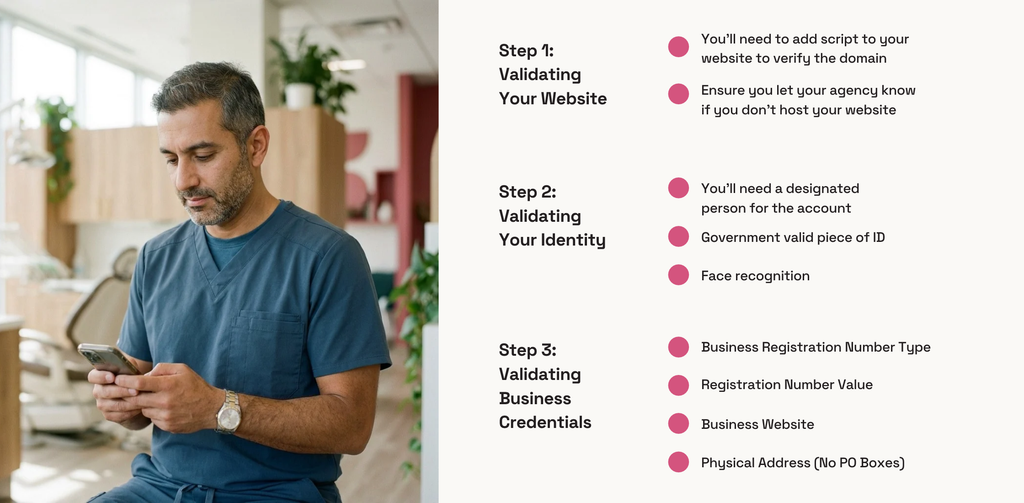
If you’re a dentist who owns your practice, you may be able to complete the process yourself. If you’re an office manager or another team member, you’ll need to be authorized to represent the business.
A note for Canadian dental practices: OpenAI’s Business Hub availability varies by business type and location. Before preparing your documents, check whether your practice has an eligible listing available to claim. Not every local business is currently eligible, and the option to create a new listing may not be available for local dental practices.
How to Sign Up and Claim Your Business: Step by Step
The setup process consists of two main stages: proving your connection to the dental practice and completing identity verification so your profile information can be managed and your visibility insights can be accessed.
Step 1: Open ChatGPT Business Hub
Sign in to ChatGPT using a company-controlled account (ideally tied to a business email, since this account will become the primary administrator). Open Business Hub from the left sidebar, or go directly to chatgpt.com/business-hub.
Step 2: Search for Your Business
Type your dental practice’s name or website domain into the search bar and look for the matching listing.
If your practice appears, select the correct listing and confirm the ChatGPT account you want to use to manage the profile.
If you don’t see your practice, it may not currently be eligible for claiming through Business Hub. The option to create a new listing is currently limited to certain eligible online businesses, so local dental practices may need to wait for broader availability.
Step 3: Verify Your Connection to the Business
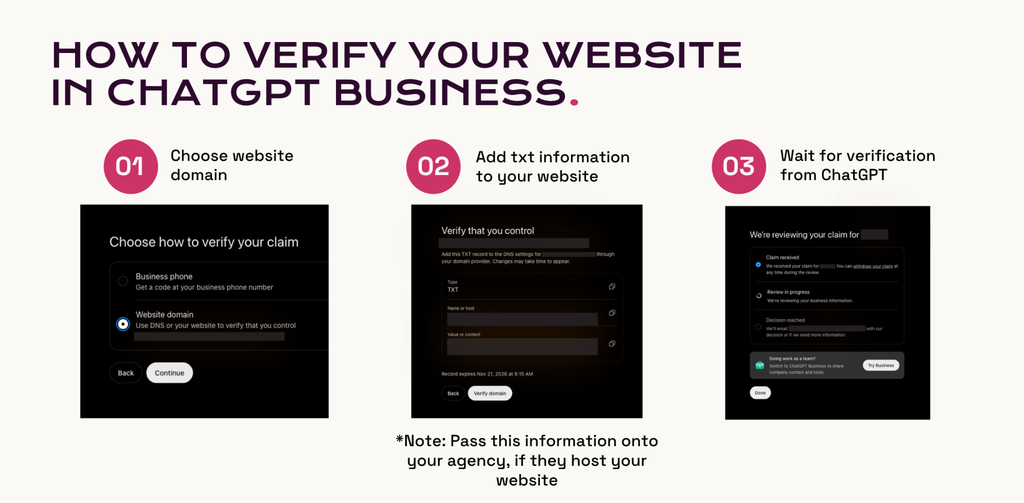
ChatGPT will prompt you to prove you are associated with the dental practice using one of the available verification methods for your listing:
- Business Phone: Receive a verification code via SMS text or an automated phone call to your listed business number.
- Business Email: Receive a one-time code sent to an official email address associated with your practice.
- Website Domain (DNS): Copy the TXT record provided by ChatGPT and add it to your website’s DNS settings (e.g., Cloudflare, GoDaddy, Namecheap). Once added, return to Business Hub and click Verify domain.
The available verification methods will depend on your business listing. If you don’t have access to one method, check whether another option is available.
Step 4: Wait for Initial Claim Review
Once you submit your verification method, OpenAI will review your claim and notify you via email when it is approved or if additional information is needed.
Keep an eye on the email address associated with your ChatGPT account so you don’t miss any updates.
Step 5: Complete Identity Verification via Persona
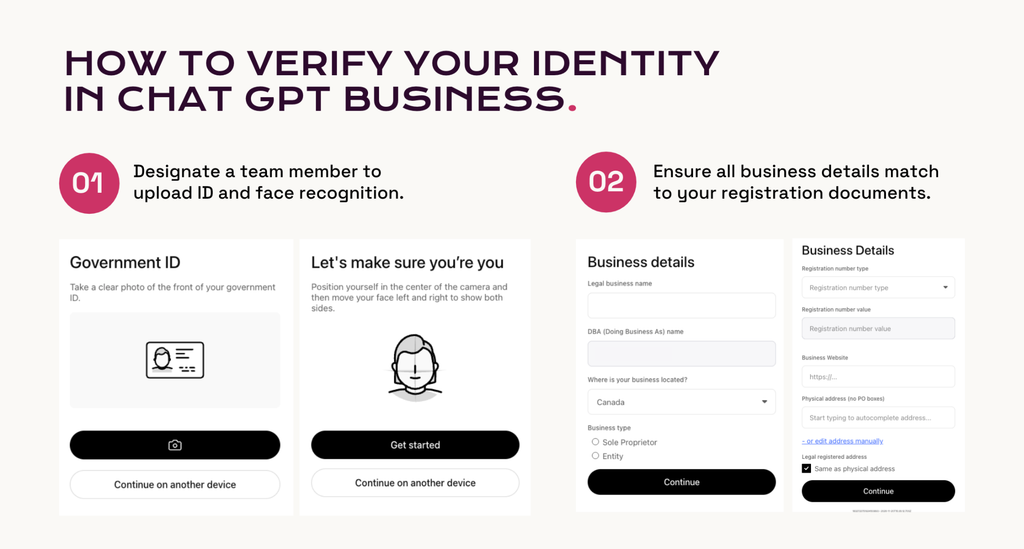
To publish changes to your profile, access your visibility insights, connect product feeds, or earn the blue verified badge, you must complete a second verification through OpenAI’s identity partner, Persona.
Have the following ready:
- A valid government-issued ID.
- Official business registration details.
- Proof that you are authorized to represent the dental practice.
This is a separate step from verifying your connection to the business. Even if you’ve already verified your website domain or business email, Persona verification is still required to unlock these additional features.
Step 6: Update Your Profile Details
Once Persona approves your identity, head back into Business Hub to review and update your available business information.
For a dental practice, this is a good opportunity to make sure your profile accurately represents your brand and the services you provide. Review details such as:
- Business Description: Clearly explain who your practice serves, what makes it different, and the types of dental care you offer.
- Business Category: Ensure your practice is accurately categorized.
- Website: Confirm your website link is correct and directs patients to the right place.
- Logo and Branding: Add your official practice logo and other available visual assets.
You should also review the information available on your website, Google Business Profile, and other online directories. Make sure your practice name, address, phone number, operating hours, services, and other important details are consistent across platforms.
OpenAI reviews profile edits before publishing them, and updates can take time to appear in ChatGPT responses. Keep in mind that ChatGPT may still reference other online sources when answering questions about your practice.
Take Control of Your AI Presence Today
Patients are changing the way they search for dental care, and AI is becoming an increasingly important part of that process. Making sure your dental practice is accurately represented online is one more way to support your visibility and help potential patients find the information they need.
If your practice is eligible, head over to ChatGPT Business Hub, search for your business, and start the free verification process.
Want to learn more about how AI is changing dental marketing and what it means for your practice? Follow along with SmileShop for practical marketing tips, industry insights, and strategies to help your practice stay visible as the digital landscape evolves.
Bonus tip:
Make AI and digital profile access part of your employee onboarding and offboarding processes. Your dental practice’s online presence shouldn’t depend on one person’s personal account. Keep track of who has administrative access to your profiles, use company-controlled accounts where possible, and make sure access is updated whenever someone leaves the practice or changes roles. This helps protect your brand and ensures your business information remains under your control.